New Athenous API plan is now available. Explore plan!

Athenous Automate

Rules that guard spend while your team ships.

Trigger → If → Then beside Campaigns and Post. Poll spend or ROAS, react to connector health, pause with confirmation, and keep every run auditable.

  • Six startersSchedule · event · manual · polls
  • Built-in guardsQuiet hours · caps · confirm
  • Audited runsPreview · feed · 7d stats

Inside the app

See Automate in action

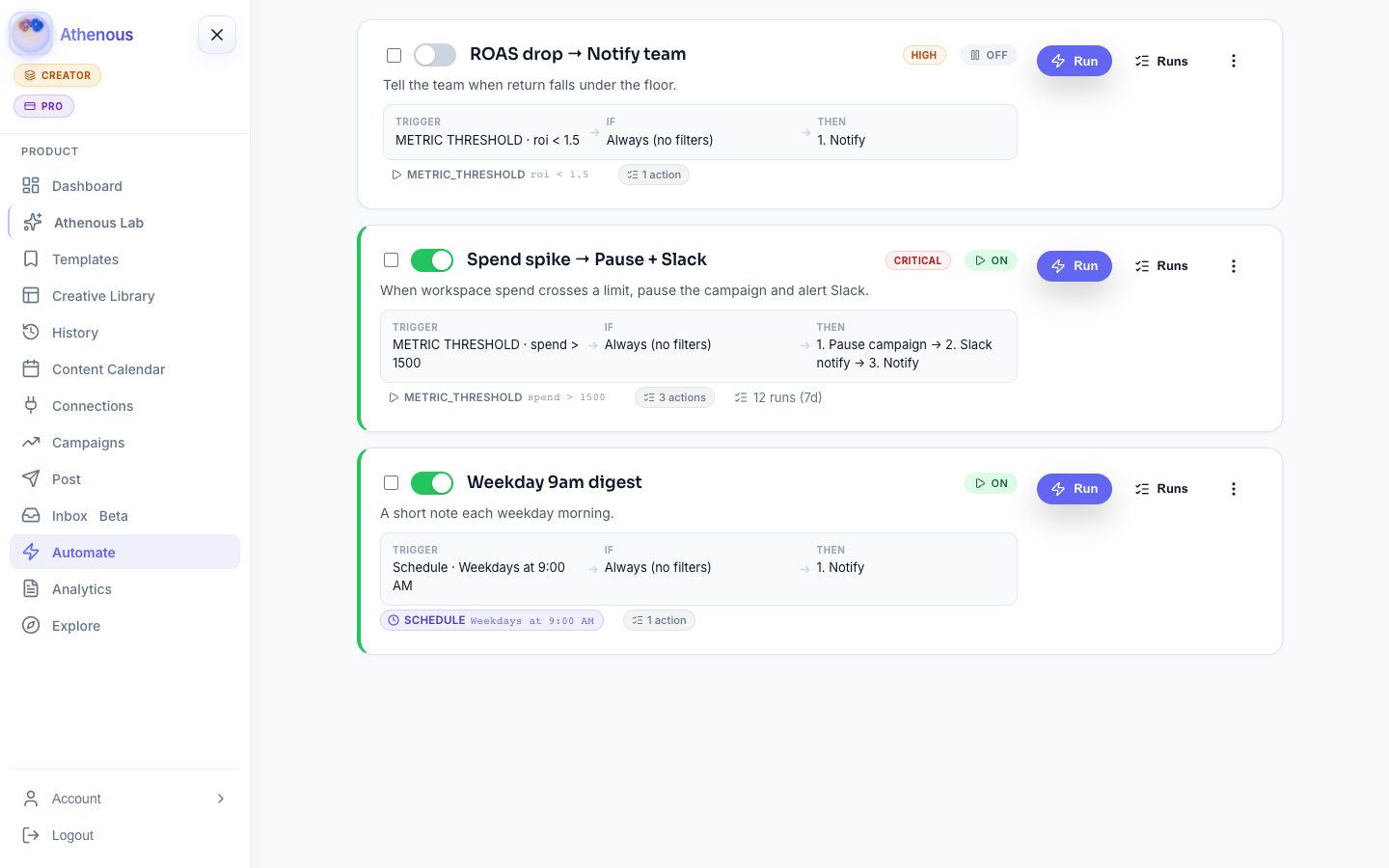
The same rules workspace your team opens at app.athenous.io/automate—playbooks, Trigger → If → Then, and run controls in one place.

Athenous Automate with spend, ROAS, and weekday rules.

The rule

Same Trigger → If → Then you see in the app.

Every rule card summarizes the flow the engine actually runs—readable before you enable it.

  1. Trigger

    When it starts

    Schedule (weekdays), events from campaigns/posts/connectors, manual Run, or polls for spend, ROAS, campaign status, and connector health.

  2. If

    When it should fire

    AND/OR filters on channel, status, and context—plus quiet hours, fire caps, date windows, and confirm-before-pause.

  3. Then

    What it does

    Chain notify, Slack, signed webhook, pause/update campaign, notes, delay, and log. Planned steps stay labeled until wired.

Playbooks

Start from a Ready template

Featured playbooks match the template gallery in Automate—clone, tune, enable.

  • Ready

    Spend spike → Pause + Slack

    Poll spend > $1,500 / 15m, confirm pause, alert Slack + notify.

    METRIC_THRESHOLD · critical
  • Ready

    ROAS drop → Notify team

    When ROI falls below target, raise a high-priority in-app alert.

    METRIC_THRESHOLD · high
  • Template

    Connector offline → Webhook

    Health poll or disconnect event posts to your ops webhook.

    CONNECTOR_HEALTH · event

How it works

From playbook to an audited run

  1. 01

    Pick a playbook

    Spend spike, ROAS drop, post failed, connector offline—or start blank.

  2. 02

    Choose the trigger

    Schedule, event, manual, or a poll on synced metrics and connection health.

  3. 03

    Add guards

    Filters, quiet hours, max fires, date window, frequency caps, severity.

  4. 04

    Preview & ship

    Dry-run first. Run history, activity feed, and 7-day stats show what fired.

Why teams use it

Ops automation without a second stack

  • One engineAds metrics, social events, and connector health beside Post, Campaigns, and Lab.
  • PlaybooksReady templates for spend, ROAS, publish fails, and offline connections—clone and tune.
  • Scale the listClone, bulk enable/delete, server search, tags, weekday schedules, CSV with guards.
  • Honest scopeCapabilities banner + API mark live vs planned—email, create-post, CRM stay planned.

Capabilities

What runs today

Same list as the in-app banner and /capabilities API. Attach only what is live.

Triggers

  • Schedule
  • Event
  • Manual
  • Spend / ROAS
  • Campaign status
  • Connector health

Actions · live

  • Notify
  • Slack
  • Webhook · HMAC
  • Pause / update
  • Notes
  • Delay
  • Log

Planned

  • Email
  • Create post
  • CRM sync

Platform

Where it sits in Athenous

Inside Automate

Playbooks, run history, activity feed, 7-day analytics, clone & bulk, search, tags, CSV, and capabilities—all in Automate.

Beside Campaigns & Post

Polls read synced ad data; events come from Campaigns, Post, and connector health. Lab drafts—Automate runs the handoff.

Questions

Automation questions

When does a workflow run?

On a cron or weekday schedule, when an internal event fires (campaign or post lifecycle, connector health), when you click Run, or on a poll for spend/ROAS, campaign status, or connector health.

Which actions execute today?

Notify, Slack Incoming Webhook, outbound webhook with optional HMAC, pause or update campaign, notes, delay, and log. Email, create-post, and CRM sync remain planned—see the capabilities banner.

How do guardrails work?

Quiet hours, max fires per day, active date window, and per-action frequency caps. Destructive steps can require confirmation on manual runs. Severity and priority order matching rules.

Can I preview before a rule fires?

Dry-run / preview shows condition matches and action plans without destructive steps. Run detail, the activity feed, and 7-day analytics cover what fired.

How do I manage many rules?

Clone, bulk enable or delete, server search, and tags. CSV import/export includes severity and guard config. Start from Ready playbooks in the template gallery.

Does Automate publish without a person?

Only the steps you attach. Create-post stays planned. Pausing or updating campaigns follows your confirmation and guardrails.

Athenous Automate

Ship rules your team can audit

Open Automate, pick a Ready playbook, set Trigger → If → Then, and preview before it fires.