Athenous Social Inbox · Beta
Keep every conversation going
Want conversations that grow? Reply to every comment, DM, and review from one calm inbox.
- Commentson your posts
- MessagesMessenger & X
- Reviewswhen ratings land
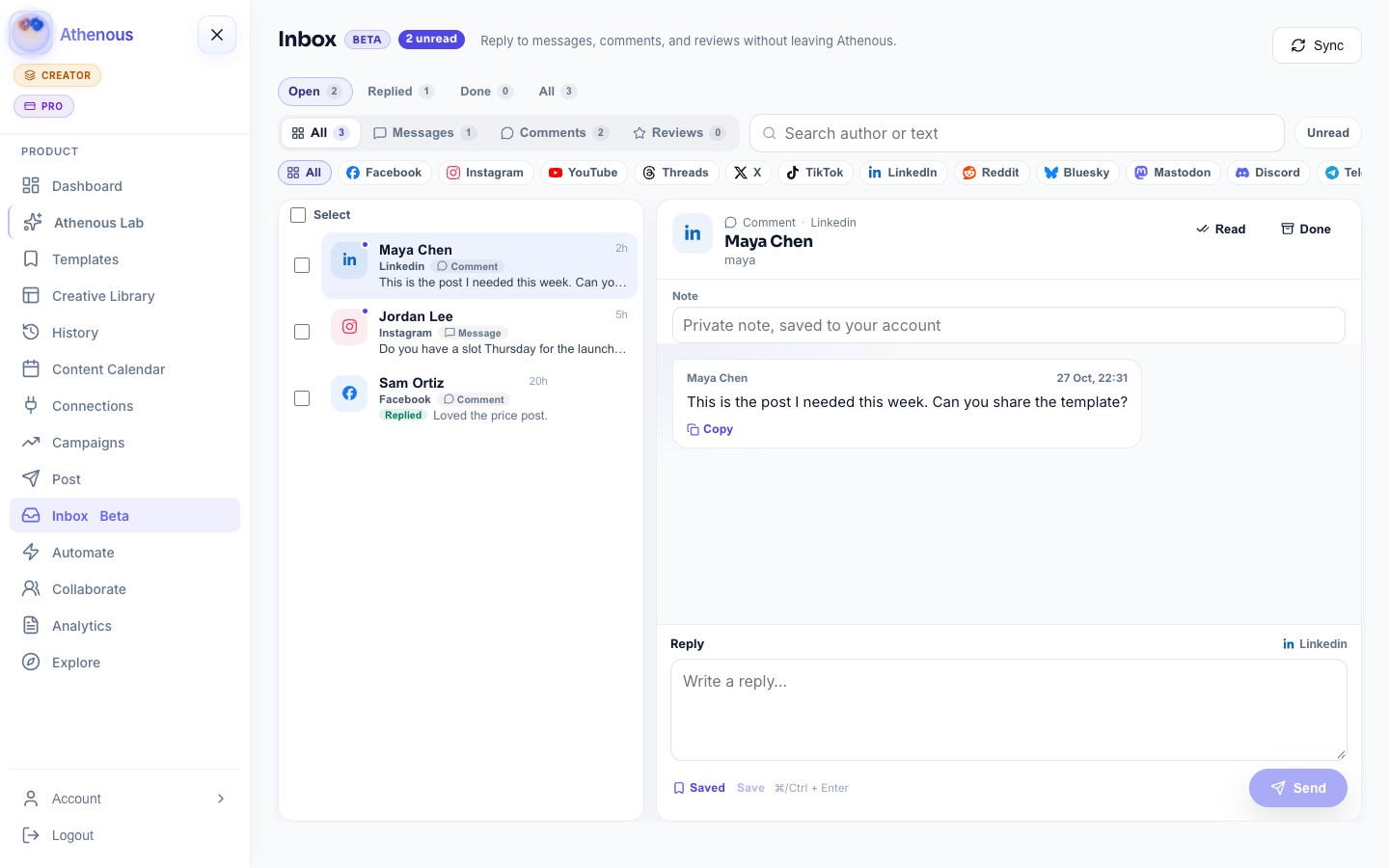
No conversation left behind
A focused space to clear every reply
Stay on top of comments and messages so nothing slips—without five native apps or a noisy feed.
-
MessagesPage Messenger and X DMs in one queue.
-
CommentsFrom posts you already published in Athenous.
-
ReviewsStar ratings and review text when available.
-
Cross-platform support
Manage conversations across Facebook, Instagram, YouTube, Threads, X, TikTok, LinkedIn, and Reddit—all in one place.
-
Filters & sorting
See unread, messages, comments, or reviews at a glance—and search when context matters.
-
Reply your way
Respond from Athenous on supported channels, or open the native thread when you need the full platform UI.
-
Clean sync
Upserts by channel + external id. Re-sync refreshes text—it never clones the same comment.
-
Beside publishing
Triage next to Post and Campaigns—the same Connections tokens, no second community stack.
-
Calm workspace
A dedicated inbox module from Explore—built for clearing conversations, not scrolling feeds.
Stay real, reply faster
Keep conversations flowing without the tab chaos
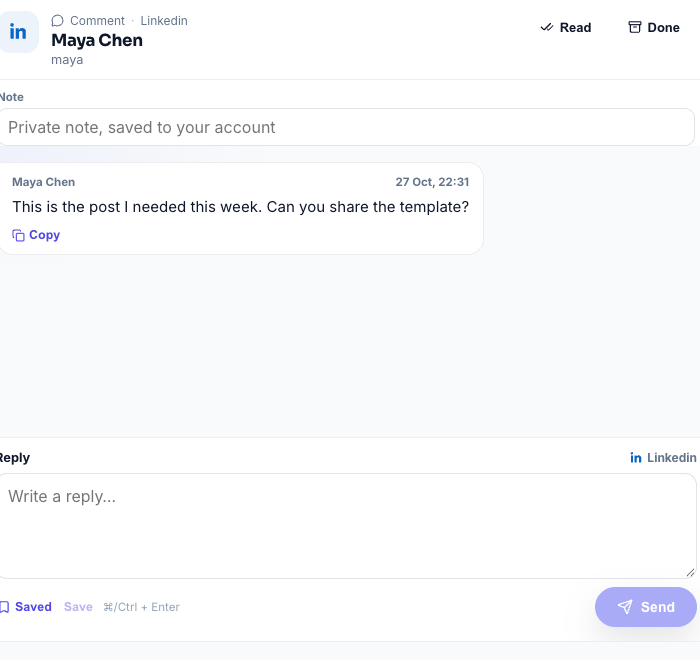
Open a thread, reply in context, mark unread to revisit, or archive when you’re done.
-
Reply in placeSend replies for supported channels from the detail pane without leaving Athenous.
-
Mark & archiveToggle read state and archive closed threads so the queue stays focused.
-
Same ConnectionsUses the Posts tokens you already connected—no extra community tool to provision.
Coverage
Networks you can sync today
Comment sync follows posts you published through Athenous. Messaging starts with Page Messenger and X DMs.
Availability depends on your plan and Connections. Meta live webhooks keep FB/IG fresh; other channels update on Sync or the scheduled pull.
How it works
From Explore to a cleared queue
-
01
Add the module
Open Explore, add Social Inbox, then open Inbox from the sidebar or Dashboard.
-
02
Connect channels
In Connections, link the Posts accounts you publish with. Inbox reuses the same OAuth credentials.
-
03
Sync
Click Sync (or land on an empty inbox—Athenous auto-syncs once). Live items upsert into the stream.
-
04
Triage & reply
Filter by Messages / Comments / Reviews, open a thread, reply or archive—and keep publishing beside the conversation.
Why teams use it
Built for people who publish
- One listMessages, comments, and reviews tagged by channel in a single workspace view.
- Faster resolutionFilters and search cut the tab-switching that slows response time.
- Beside the calendarTriage next to Post and Campaigns—not a separate community stack.
- Team-readyInvite collaborators with Collaborate and shared Connections so the same channels feed the queue.
Questions
Social Inbox questions
Which item types appear in the inbox?
Three types: messages (DMs and similar inbound chat), comments on your published posts, and reviews (including star ratings when available). Tabs and filters let you focus on one type at a time.
Which networks sync comments today?
Comment sync covers Facebook, Instagram, YouTube, Threads, X, TikTok, LinkedIn, and Reddit posts you published through Athenous. Direct messages sync for Facebook Page Messenger and X. Live Meta webhooks keep FB/IG fresh; other channels update on Sync or the scheduled pull.
Do I need Athenous Post to use Inbox?
No. Social Inbox is its own Explore module. Comment sync works best when you also publish with Athenous Post/Social so publications have platform IDs to fetch against.
Will Sync create duplicates?
No. Items with a channel + external id are upserted—re-syncing refreshes text and metadata instead of cloning the same comment.
Can my team share one inbox?
Inbox is scoped to your Athenous account/workspace login. Invite collaborators with Collaborate and shared Connections so the same channels feed the conversations you manage.
Is this a replacement for native Meta Inbox?
It is a workspace-first triage layer next to publishing and ads—not a full Meta Business Suite replacement. Use it to keep community replies beside your calendar; keep native tools for edge cases your plan does not sync yet.
Explore more
Publish, then keep the conversation
Scheduling starts the loop. Inbox closes it.
Start clearing the queue
Add Social Inbox from Explore, connect your Posts channels, and sync your first messages, comments, and reviews.